
WhatsApp strengthens two-step verification, adds enhanced call information
- Posted on Aug. 26, 2026, 10 a.m.
WhatsApp Boosts Security: Enhanced Two-Step Verification & Smarter Call IDs Arrive
WhatsApp is rolling out significant security enhancements today, aiming to provide users with greater protection and more informed communication. The popular messaging app is bolstering its two-step verification system and introducing more detailed call information for incoming calls.
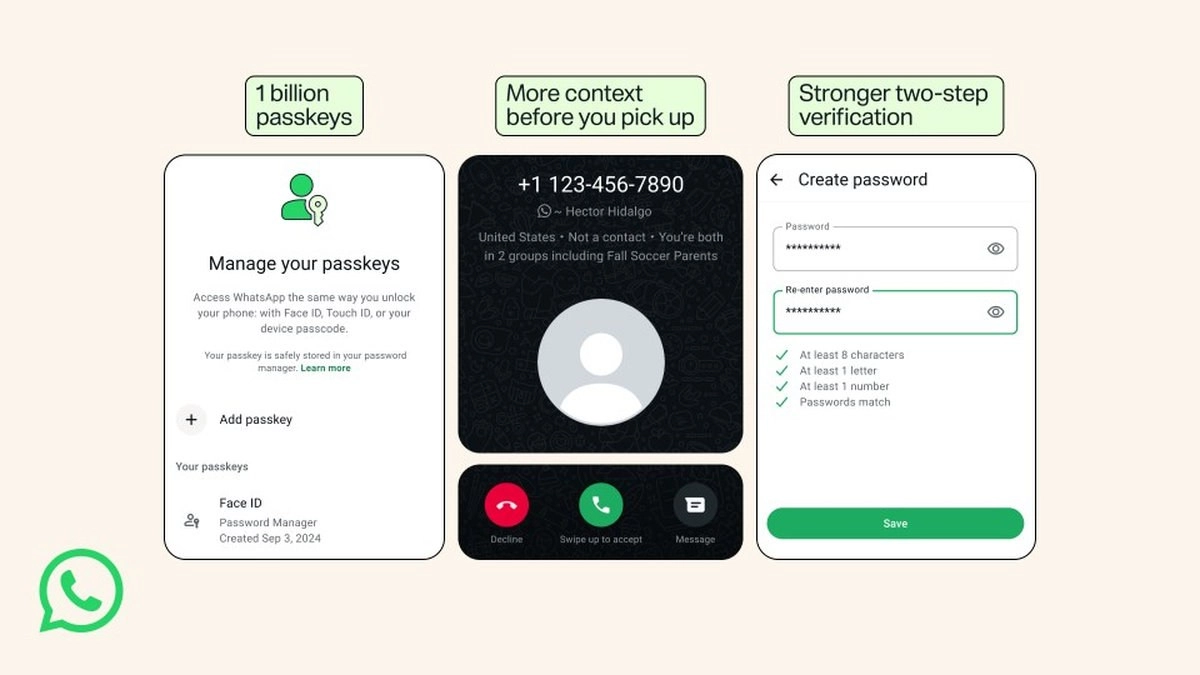
Stronger Two-Step Verification: Goodbye PIN, Hello Password!
The evolution of two-step verification on WhatsApp marks a pivotal shift. Previously, users relied on a six-digit PIN for an extra layer of security. Now, WhatsApp is transitioning to a more robust password system. This new approach allows for longer, alphanumeric combinations, including special characters, making it considerably more difficult for unauthorized access attempts.
Enhanced Call Information: Stay Ahead of Scammers
In a move designed to combat spam and fraudulent calls, WhatsApp is enhancing the information presented for incoming calls from unknown numbers. When a call comes from someone not saved in your contacts, you'll now receive additional context. This includes details like the caller's country of origin and any mutual groups you share. This proactive measure is intended to help users identify potentially suspicious calls more effectively.
It's important to note that this enhanced call information feature is currently exclusive to Android devices.
Embrace Passkeys for Seamless & Secure Access
WhatsApp is strongly encouraging users to adopt passkeys, a modern and highly secure authentication method. Passkeys enable effortless account access using your device's biometric features like fingerprint or facial recognition, or your existing screen lock. WhatsApp highlights passkeys as the "fastest and most secure way to verify it's really you, with no codes or PINs."
Already adopted by over a billion users, passkey functionality has been expanded. You can now add multiple passkeys to a single account, a valuable feature for those who manage their WhatsApp on both Android and iOS devices. To set up a passkey, navigate to Settings > Account > Passkeys.
Source
0 Responses Write a Response