Samsung Galaxy S26 series gets a feature that many other Android phones had for years
Samsung Galaxy S26 series gets a feature that many other Android phones had for years
Posted on June 13, 2026, 9:06 p.m.
Samsung's Galaxy-branded smartphones and tablets have been lacking a feature that many other Android devices, especially from Chinese brands, had for years. We are talking about the real-time network speed indicator displayed in the status bar, now available for Galaxy users via the QuickStar module in Samsung's Good Lock customization app.
Samsung users could get a real-time network speed indicator on their Galaxy phone, but it required a third-party app or enabling a firmware flag if the device was rooted. But that's not needed now if your device is running the Android 17-based One UI 9, which is currently only available as a beta to the Galaxy S26 series smartphones in six countries.
Tech article image
The reason you need One UI 9 is that the real-time network speed indicator via QuickStar is currently only supported on One UI 9, and it's unclear whether it will be supported in older One UI versions.
That said, if you own a Galaxy S26 series smartphone running One UI 9 beta and want the real-time network speed indicator, you will first have to install Good Lock from theGoogle Play Storeor Samsung'sGalaxy Storeif you don't have it already.
The version of QuickStar that brings the network speed indicator is 15.7.00.27. If it's notavailable through Galaxy Store, you can install it manually by downloading the APK file (at your own risk) fromhere.
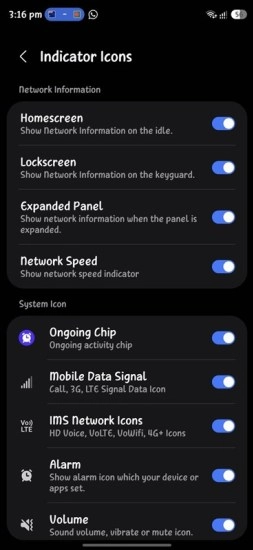
After that, open Good Lock > open QuickStar from the Plugins section > tap on the toggle at the top to enable QuickStar's features > tapVisibility of indicator icons> tap the toggle next to theNetwork Speedoption. Once you do that, the real-time network speed indicator will appear in the top-right corner of the screen.
Tech article image
Via 1,Via 2

0 Responses Write a Response