
Motorola rolls out Android 17 to the Razr Ultra 2026
- Posted on Oct. 8, 2026, 7 a.m.
Motorola Razr Ultra 2026 Gets Android 17: What's New?
The highly anticipated Android 17 update has officially landed for the Motorola Razr Ultra 2026, bringing a host of exciting new features and performance enhancements to users in the United States. If you're a proud owner of this foldable flagship, get ready for a significant software upgrade.
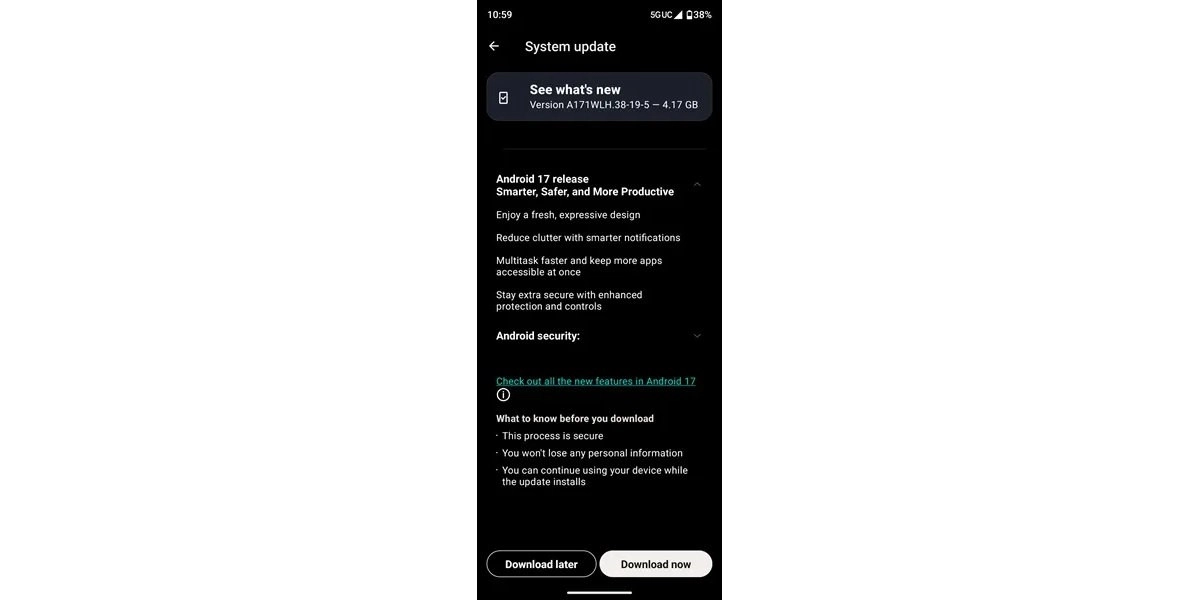
This substantial update, clocking in at a sizable 4.17GB, is rolling out via over-the-air (OTA) delivery. For a smooth installation, it's recommended to connect to a stable and fast network. Upon successful installation, your Razr Ultra 2026 will be running the latest software version, identified as A171WLH.38-19-5.
Key Features of the Android 17 Update for Razr Ultra 2026
Motorola's latest software iteration for the Razr Ultra 2026 is designed to deliver a more intuitive and powerful user experience. Key highlights include:
- Fresh, Expressive Design: Experience a cleaner, more streamlined interface with reduced visual clutter, making navigation more intuitive.
- Smarter Notifications: Enjoy enhanced notification management that keeps you informed without overwhelming you.
- Faster Multitasking: Boost your productivity with the ability to access and manage more applications simultaneously, enabling smoother transitions between tasks.
- Enhanced Security: Benefit from the latest security patches and features, ensuring your device and data are better protected.
Introducing Motorola's Qira AI Agent
A significant addition to this update is Motorola's Qira AI agent. First unveiled at CES in January and confirmed to be part of the Android 17 rollout, Qira promises to revolutionize how you interact with your device. This intelligent assistant is now integrated and ready to assist you.
Customization and Improved Display
The Android 17 update also unlocks new levels of personalization and display control:
- AI Key Remapping: Take full control of your device by remapping the double-tap function of the dedicated AI Key.
- Advanced HDR Settings: Elevate your viewing experience with new HDR settings. An "Intensity" slider allows you to fine-tune your screen's brightness, expand the color range, and improve overall clarity.
- Notification Haptic Feedback: Enjoy a more tactile interaction with your device, as haptic feedback is now implemented when dismissing notifications.
0 Responses Write a Response