
Gemini can now import your chat history from other AI chatbots
- Posted on March 27, 2026, 4 p.m.
Seamlessly Transfer Your AI Chat History to Google Gemini: A Game-Changer for Personalization
In the rapidly evolving landscape of artificial intelligence, AI chatbots have cemented their role in our daily digital interactions. Whether you're a devoted user of ChatGPT, prefer the nuanced responses of Claude, or lean towards Google's innovative Gemini, each platform excels at learning from your unique behavior, interests, and past conversations. This personalized data is crucial for delivering relevant and insightful answers. However, a significant hurdle has long plagued users looking to explore new AI horizons: the inability to carry over their valuable chat history, forcing a fresh start with every switch.
Breaking down this barrier, Google Gemini has rolled out a groundbreaking update designed to streamline your AI migration experience. Introducing the new Import memory tool, Gemini now empowers users to effortlessly transfer their comprehensive chat history from competing AI platforms.
Effortless AI Chat History Migration to Gemini
The process for importing your invaluable conversational data into Gemini is remarkably straightforward. Here’s a quick guide to getting started with the new Import memory tool:
- Begin by locating and clicking the "Import memory in Gemini" button within the Gemini interface.
- This action will generate a specific prompt. Copy this prompt.
- Navigate to your current AI chatbot (e.g., ChatGPT, Claude) and paste the copied prompt into its chat input.
- Once your existing chatbot responds, copy its generated output.
- Finally, return to Gemini's import tool text box, paste the response, and confirm the import.
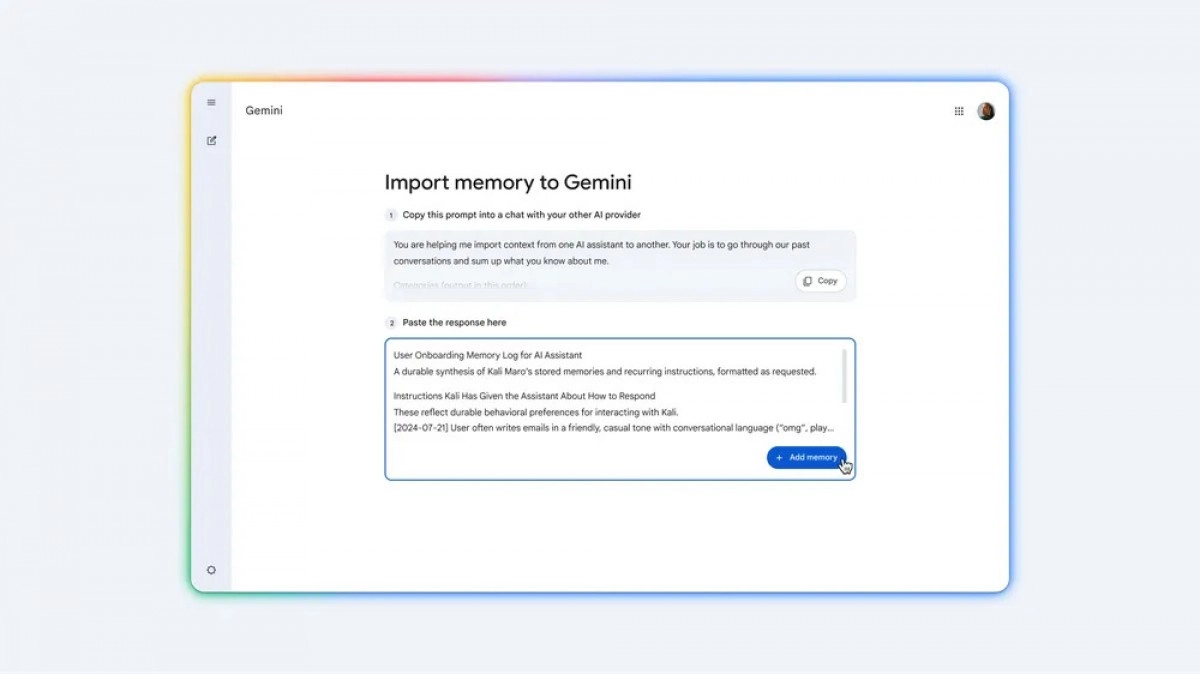
This seamless data transfer grants Google Gemini immediate access to your accumulated personal preferences and conversational context from other platforms. The direct benefit? Gemini can now leverage this rich history to deliver significantly more contextual, accurate, and truly personalized AI responses, making your interactions feel more natural and informed from day one.
Alternative Data Transfer and Key Limitations
For those who prefer a more traditional method, Gemini also supports direct uploads. You can export your chat history from other AI services and upload it as a ZIP file directly to Gemini. This method accommodates substantial data, with Gemini supporting ZIP files up to 5GB in size, allowing for the transfer of extensive conversational archives.
It's important to note a current limitation: while chat conversations are fully transferable, Gemini’s import tool does not currently support project files or other attachments embedded within your past chatbot interactions. Users should keep this in mind when migrating their data.
Source
0 Responses Write a Response