
Google's AI Mode in Chrome now opens links side by side in the same tab
- Posted on April 17, 2026, 9 a.m.
Google Chrome's AI Mode Evolves: Seamless Side-by-Side Link Exploration
In a rapid succession of AI-driven enhancements, Google continues to refine its user experience. Following the introduction of personalized image generation within Gemini, the search behemoth is now rolling out a significant upgrade to its AI Mode in Chrome, transforming how users interact with web links.
Previously, AI Mode might present you with a curated list of links. Now, when you choose to explore one of these AI-generated suggestions, it will dynamically open alongside your AI chat interface within the same browser tab. This innovative approach dramatically simplifies navigation, eliminating the need to constantly switch between multiple tabs and effectively combating tab clutter.
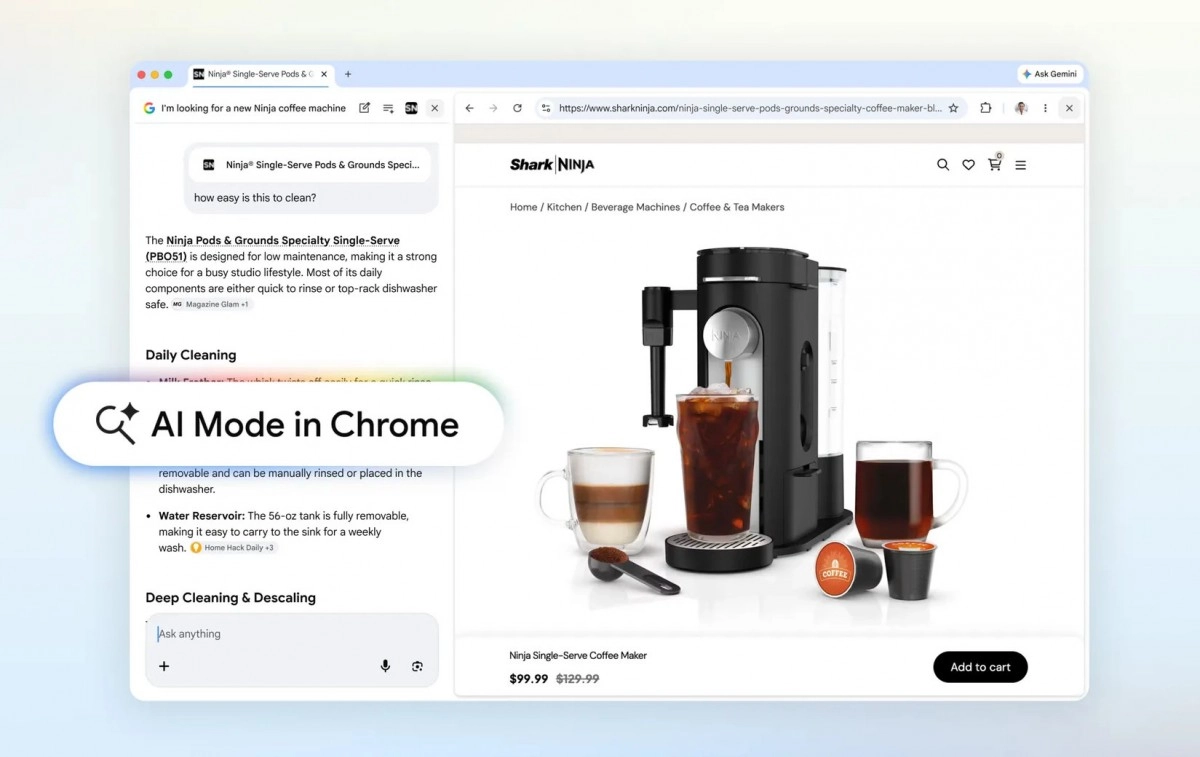
This integrated view also makes it remarkably easier to engage in follow-up questions with AI Mode. Imagine searching for a new coffee machine, receiving relevant link suggestions, and then seamlessly opening a product page while simultaneously continuing the conversation with the AI for more specific queries or comparisons. Google highlights this capability, emphasizing how it preserves your conversational flow.
Furthermore, this feature is designed to enhance deep dives into complex topics. For instance, if you're researching "the different McLaren racing teams and how their pit crews train," you can now explore information from McLaren's official website directly within the AI's context, without interrupting your research journey. Early testers of this feature reported that the side-by-side display of both Search results and web content significantly improved their focus and productivity while exploring relevant pages.
A new intuitive '+' menu, accessible within the Chrome search box on both desktop and mobile devices, empowers users to search across their currently open tabs. You can select recent tabs, incorporate them into your AI Mode search, and even blend various tabs, images, or documents like PDFs to provide richer context for your AI inquiries. Complementing this, tools such as Canvas and image creation are now readily available wherever this new '+' menu appears in Chrome.
While these advancements represent a significant leap forward, it's important to note that this enhanced AI Mode functionality is currently exclusive to users in the United States, available in the latest version of Chrome. Google has indicated that global rollout is planned for the near future.
Source
0 Responses Write a Response