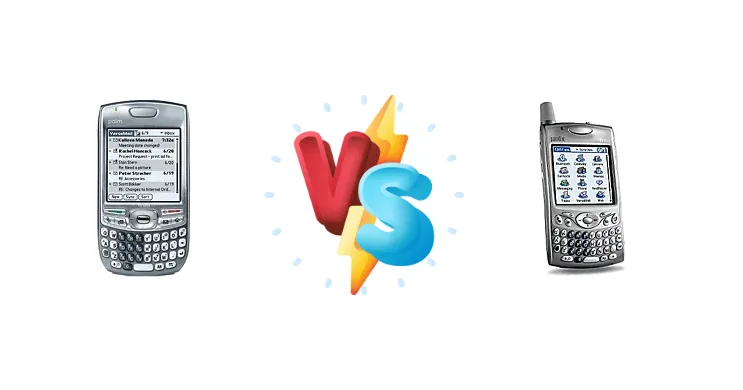
The Palm Treo 680 and 650 represent a pivotal moment in the evolution of PDAs, bridging the gap between organizer functionality and smartphone capabilities. Both devices share a core architecture, but subtle refinements in design and potentially software make choosing between them a nuanced decision for users invested in the Palm ecosystem.
🏆 Quick Verdict
For the average user seeking a reliable Palm Treo, the 680 offers a marginal advantage due to its slightly newer release and potential for updated software support. However, the 650 remains a highly capable device, especially if found at a significantly lower price point.
| Network |
|---|
| 2G bands | GSM 850 / 900 / 1800 / 1900 | GSM 850 / 900 / 1800 / 1900 |
| EDGE | Class 10 | Class 10 |
| GPRS | Class 10 | Class 10 |
| Technology | GSM | GSM |
| Launch |
|---|
| Announced | 2006, October | 2004, Q4 |
| Status | Discontinued | Discontinued |
| Body |
|---|
| Dimensions | 111.8 x 58.4 x 20.3 mm (4.40 x 2.30 x 0.80 in) | 113 x 59 x 23 mm (4.45 x 2.32 x 0.91 in) |
| Keyboard | QWERTY | QWERTY |
| SIM | Mini-SIM | Mini-SIM |
| Weight | 157 g (5.54 oz) | 178 g (6.28 oz) |
| Display |
|---|
| Resolution | 320 x 320 pixels, 1:1 ratio (~181 ppi density) | 320 x 320 pixels, 1:1 ratio (~189 ppi density) |
| Size | 2.5 inches, 20.2 cm2 (~30.9% screen-to-body ratio) | 2.4 inches, 44 x 44 mm, 18.6 cm2 (~27.9% screen-to-body ratio) |
| Type | TFT resistive touchscreen, 65K colors | TFT resistive touchscreen, 65K colors |
| | 5-way navigation button | Five-way navigation button |
| Platform |
|---|
| CPU | Intel PXA270 312 MHz | Intel PXA270 312 MHz |
| OS | Palm OS 5.4.9 | Palm 5.4 |
| Memory |
|---|
| Card slot | SD/MMC, up to 4 GB | SD/SDIO/MMC, up to 2 GB |
| Internal | 64MB | 23MB |
| Main Camera |
|---|
| Single | VGA | VGA |
| Video | CIF | Yes |
| Sound |
|---|
| 3.5mm jack | No | No |
| 35mm jack | No | No |
| Alert types | Vibration; Downloadable polyphonic ringtones | Vibration; Downloadable polyphonic, MP3 ringtones |
| Loudspeaker | Yes | Yes |
| | - | Ringtones can be assigned to contacts |
| Comms |
|---|
| Bluetooth | 1.2, A2DP | Yes |
| Infrared port | Yes | Yes |
| Positioning | No | No |
| Radio | No | No |
| USB | Proprietary | Proprietary |
| WLAN | No | No |
| Features |
|---|
| Browser | WAP 2.0 / HTML (Blazer 4.5) | HTML |
| | Document editor (Word, Excel, PowerPoint, PDF)
MP3 player
Organizer
Voice memo | MP3 player
Organizer
World Clock |
| Battery |
|---|
| Stand-by | Up to 300 h | Up to 300 h |
| Talk time | Up to 4 h | Up to 6 h |
| Type | Removable Li-Ion battery | Removable Li-Ion battery |
| Misc |
|---|
| Colors | Graphite, Crimson, Arctic, Copper | - |
| Price | About 220 EUR | - |
Palm Treo 680
- Potentially newer software support
- Slightly more refined design with smaller bezels
- May benefit from minor hardware revisions
- Likely higher price point
- Performance is fundamentally the same as the 650
Palm Treo 650
- Generally more affordable
- Proven reliability and established user base
- Excellent value for basic PDA functionality
- May receive fewer software updates
- Slightly larger bezels compared to the 680
Display Comparison
Both the Treo 680 and 650 feature a 320x240 resolution touchscreen display. Given the identical resolution, the user experience will be largely similar. However, the 680 may benefit from slight improvements in panel calibration or backlight technology, though this is difficult to quantify without direct comparison. The smaller bezels on the 680, while subtle, contribute to a more modern aesthetic. Color accuracy and viewing angles are likely comparable, typical for displays of this era.
Camera Comparison
Both the Treo 680 and 650 feature a VGA camera. Image quality will be limited by the low resolution and sensor size. Differences in image processing algorithms, if any, are unlikely to be substantial. The camera is primarily useful for quick snapshots and visual notes, not for high-quality photography. Focusing on the camera as a deciding factor between these two models is not recommended.
Performance
Both devices are powered by the Intel PXA270 312 MHz processor. This means raw processing power is virtually identical. Performance differences will likely stem from RAM allocation and software optimization. While the exact RAM amounts aren't specified, any difference in RAM speed (LPDDR or similar) would be negligible given the processor's limitations. Thermal management is unlikely to be a significant concern with this low-power CPU, meaning sustained performance will be consistent on both devices. The user experience will be similar for tasks like email, contacts, and basic applications.
Battery Life
Battery life on both devices will depend heavily on usage patterns, particularly the frequency of wireless data usage. While specific mAh ratings aren't provided, the 680 may benefit from minor improvements in battery chemistry or power management. Charging times will be similar, given the use of a proprietary Palm connector. Users prioritizing battery life should consider minimizing background processes and reducing screen brightness.
Buying Guide
Buy the Palm Treo 680 if you prioritize having the latest software updates and potentially benefit from minor hardware revisions. Buy the Palm Treo 650 if you are budget-conscious and value a proven, reliable platform with a well-established user base. Both are excellent choices for users deeply embedded in the Palm ecosystem needing robust PIM functionality and wireless connectivity.
Frequently Asked Questions
❓ Will I notice a performance difference between the Treo 680 and 650 when running Palm OS applications?
Given that both devices utilize the same Intel PXA270 312 MHz processor, you are unlikely to perceive a significant performance difference when running standard Palm OS applications. Any variations will be attributable to RAM allocation and software optimization, which are likely minimal.
❓ Is the camera on either the Treo 680 or 650 suitable for taking high-quality photos?
No. Both devices feature a VGA camera, which is limited in resolution and image quality. The camera is best suited for quick snapshots and visual notes, not for capturing detailed or high-resolution photographs. Do not expect smartphone-level camera performance.
❓ Which Treo is better for syncing with a modern computer?
Syncing either device with a modern computer requires utilizing older Palm Desktop software and potentially USB drivers. Compatibility can be challenging and may require troubleshooting. Both devices will present similar hurdles in this regard.