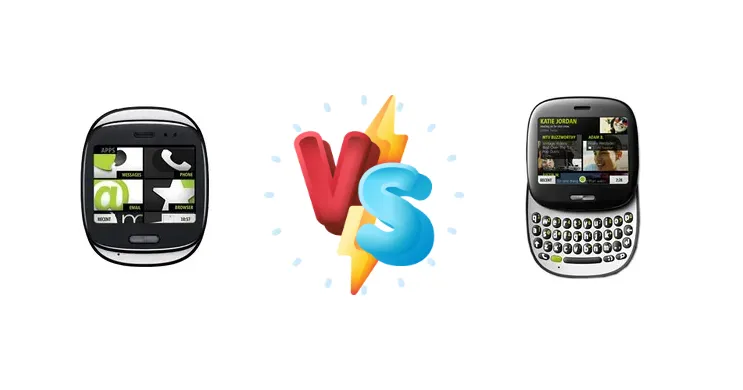
Launched in 2010, the Microsoft Kin ONEm and Kin One represented a unique attempt to cater to a social-first mobile experience. Despite both devices utilizing the same Nvidia Tegra chipset and 600MHz ARM 11 processor, Microsoft positioned them as distinct offerings. This comparison dissects the subtle differences and clarifies which Kin model best suits a user seeking a nostalgic glimpse into early smartphone social integration.
🏆 Quick Verdict
For the average user interested in experiencing the Kin ecosystem, the Kin One emerges as the slightly more practical choice. While both share identical core performance, the Kin One’s simpler design and potentially lower initial cost (at launch) made it a more accessible entry point into Microsoft’s social networking vision.
| Network |
|---|
| 2G bands | CDMA 800 / 1900 | GSM 850 / 900 / 1800 / 1900 |
| 3G bands | CDMA2000 1xEV-DO | HSDPA 900 / 2100 |
| Speed | EV-DO Rev.A 3.1 Mbps | HSPA 7.2/2 Mbps |
| Technology | CDMA / EVDO | GSM / HSPA |
| Launch |
|---|
| Announced | 2010, November. Released 2010, November | 2010, April |
| Status | Discontinued | Cancelled |
| Body |
|---|
| Dimensions | 84.1 x 67.6 x 18.5 mm (3.31 x 2.66 x 0.73 in) | 82.6 x 63.5 x 19.1 mm (3.25 x 2.5 x 0.75 in) |
| Keyboard | QWERTY | QWERTY |
| SIM | Mini-SIM | Mini-SIM |
| Weight | 110.6 (3.88 oz) | 110.6 (3.88 oz) |
| Display |
|---|
| Resolution | 320 x 240 pixels, 4:3 ratio (~154 ppi density) | 320 x 240 pixels, 4:3 ratio (~154 ppi density) |
| Size | 2.6 inches, 20.9 cm2 (~36.8% screen-to-body ratio) | 2.6 inches, 20.9 cm2 (~39.9% screen-to-body ratio) |
| Type | TFT | TFT |
| | - |
|
| Platform |
|---|
| CPU | 600MHz ARM 11 | 600MHz ARM 11 |
| Chipset | Nvidia Tegra | Nvidia Tegra |
| Memory |
|---|
| Call records | Practically unlimited | Practically unlimited |
| Card slot | No | No |
| Internal | 4GB 256MB RAM | 4GB 256MB RAM |
| Phonebook | Practically unlimited entries and fields, Photocal | Practically unlimited entries and fields, Photocal |
| Main Camera |
|---|
| Features | Dual-LED flash | Dual-LED flash |
| Single | 5 MP, AF | 5 MP, AF |
| Video | 480p@30fps | 480p@30fps |
| Sound |
|---|
| 3.5mm jack | Yes | Yes |
| 35mm jack | Yes | Yes |
| Loudspeaker | Yes | Yes |
| Comms |
|---|
| Bluetooth | 2.1, A2DP | 2.1, A2DP |
| Positioning | GPS, A-GPS | GPS, A-GPS |
| Radio | Stereo FM radio, RDS | Stereo FM radio, RDS |
| USB | microUSB 2.0 | microUSB 2.0 |
| WLAN | Wi-Fi 802.11 b/g | Wi-Fi 802.11 b/g |
| Features |
|---|
| Browser | WAP 2.0/xHTML, HTML | WAP 2.0/xHTML, HTML |
| Games | Yes + downloadable | Yes + downloadable |
| Java | Yes, MIDP 2.1 | Yes, MIDP 2.1 |
| Messaging | SMS(threaded view), MMS, Email, Push Email | SMS(threaded view), MMS, Email, Push Email |
| Sensors | Accelerometer, proximity | Accelerometer, proximity |
| | MP3/WAV/WMA/eAAC+ player
MP4/WMV/H.264 player
Facebook and Twitter integration
YouTube client
MS Office (Word, Excel, PowerPoint, OneNote, PDF viewer)
Voice memo
Predictive text input | MP3/WAV/WMA/eAAC+ player
MP4/WMV/H.264 player
Facebook and Twitter integration
YouTube client
MS Office (Word, Excel, PowerPoint, OneNote, PDF viewer)
Voice memo
Predictive text input |
| Battery |
|---|
| Stand-by | Up to 210 h | Up to 200 h |
| Talk time | Up to 5 h 40 min | - |
| Type | Removable Li-Ion 1240 mAh battery | Removable Li-Ion 1240 mAh battery |
| Misc |
|---|
| Colors | Black | Black |
| Price | About 90 EUR | About 290 EUR |
| SAR | 1.38 W/kg (head) 0.49 W/kg (body) | - |
Microsoft Kin ONEm
- Sliding keyboard offers improved text input.
- Potentially more premium build quality.
- Larger display for a more immersive experience.
- Bulkier and less pocketable design.
- Sliding mechanism introduces potential points of failure.
- Likely higher price point.
Microsoft Kin One
- More compact and pocketable design.
- Simpler, more streamlined user experience.
- Potentially lower cost.
- Lack of physical keyboard limits text input.
- Smaller display may feel cramped.
- Less premium feel compared to the ONEm.
Display Comparison
Both the Kin ONEm and Kin One feature displays designed for social interaction, but differ in form factor. The ONEm’s sliding keyboard necessitates a larger overall footprint, impacting screen real estate. While specific display resolutions and panel technologies aren’t detailed in the provided data, the ONEm’s larger size likely afforded a slightly more immersive viewing experience. However, the Kin One’s smaller, more focused display likely contributed to better battery efficiency due to lower pixel count and potentially reduced backlight demands.
Camera Comparison
Details regarding camera specifications are absent, but given the target audience and era, it’s unlikely either device boasted a particularly advanced camera system. The focus was on quick photo sharing to social networks, not high-resolution photography. The Kin software likely prioritized ease of uploading and tagging over image quality. Any differences in camera performance would likely stem from software processing rather than hardware capabilities.
Performance
The shared Nvidia Tegra chipset and 600MHz ARM 11 CPU mean performance is virtually identical between the Kin ONEm and Kin One. The Tegra, while innovative for its time, was not a performance leader compared to competing smartphone processors. Both devices would have struggled with demanding applications beyond basic social networking, web browsing, and media playback. The lack of detailed RAM specifications prevents a deeper analysis, but it’s reasonable to assume both models featured a similar amount of RAM, further solidifying their performance parity. Thermal management would have been a non-issue given the relatively low power draw of the ARM 11.
Battery Life
Battery capacity details are unavailable. However, the Kin One’s smaller size suggests a potentially smaller battery. The ONEm’s larger form factor could accommodate a larger battery, offering slightly longer usage times. Given the limited processing power of the ARM 11 and the focus on social networking – a relatively low-intensity task – battery life was likely adequate for a full day of moderate use on both devices. Charging times would have been slow by modern standards, given the lack of fast charging technology at the time.
Buying Guide
Buy the Microsoft Kin ONEm if you prioritize a more premium feel and a sliding keyboard for extended text input, even if it comes at a potential price premium. Buy the Microsoft Kin One if you prefer a more compact, straightforward design focused purely on social networking and ease of use, and value simplicity over advanced input methods.
Frequently Asked Questions
❓ Given the limited processing power, what kind of apps could the Kin ONEm and Kin One realistically run?
Due to the 600MHz ARM 11 processor and limited RAM, the Kin ONEm and Kin One were primarily designed for social networking, basic web browsing, email, and light media playback. Demanding applications like modern games or video editing software would have been unusable. The focus was on a streamlined experience centered around Microsoft’s Kin Studio and social integration.
❓ How did the Kin software differentiate these phones from other smartphones of the time?
The Kin software, particularly Kin Studio, was designed to automatically organize photos and videos, making them easy to share to social networks. It prioritized a 'loop' of capturing, organizing, and sharing content, rather than traditional app-centric smartphone usage. This focus on social integration was the key differentiator, even though the underlying hardware was relatively modest.
❓ Is it possible to install modern apps on either the Kin ONEm or Kin One?
No, it is highly unlikely and impractical to install modern apps on either the Kin ONEm or Kin One. The operating system is proprietary and outdated, lacking compatibility with current app ecosystems like Android or iOS. Attempts to sideload apps would likely be unsuccessful due to architectural differences and security restrictions.